Blend Optimizer
Replacing a decades-old Excel-based blend planning workflow with an AI-powered web application — turning oil-well fluid optimization from a manual spreadsheet exercise into a fast, auditable, ML-driven process.
help Plant Operations Managers run fluid blend optimization faster and more accurately — without losing the nuance and institutional knowledge currently locked inside a complex Excel model?
The Problem with BlendMaster
TETRA Technologies (NYSE: TTI) operates globally in completion fluids — the engineered salt brine solutions used to maintain pressure in oil and gas wells. Their existing blend optimization process ran through a proprietary Excel model called BlendMaster, where engineers manually input well parameters, cross-reference chemical inventories, and calculate optimal formulas for each job.
The model was powerful but brittle: only a few specialists could operate it correctly, results weren't trackable across runs, and every approval workflow ran through email threads and printed sheets. A TETRA Data Science team had already built a Machine Learning proof of concept that outperformed the manual approach. The challenge was turning that PoC into a production-ready tool their field ops teams would actually adopt.
UX Contributor on a Cross-Functional Team
SoftServe was brought in to build the full-stack application — React + Next.js frontend, Python APIs, Azure infrastructure. My role as UX Contributor covered the interaction design and prototyping from discovery through Phase 2 MVP handoff, working alongside Hernán Salvatierra (Project Lead) and Yuri Paklikovskyi.
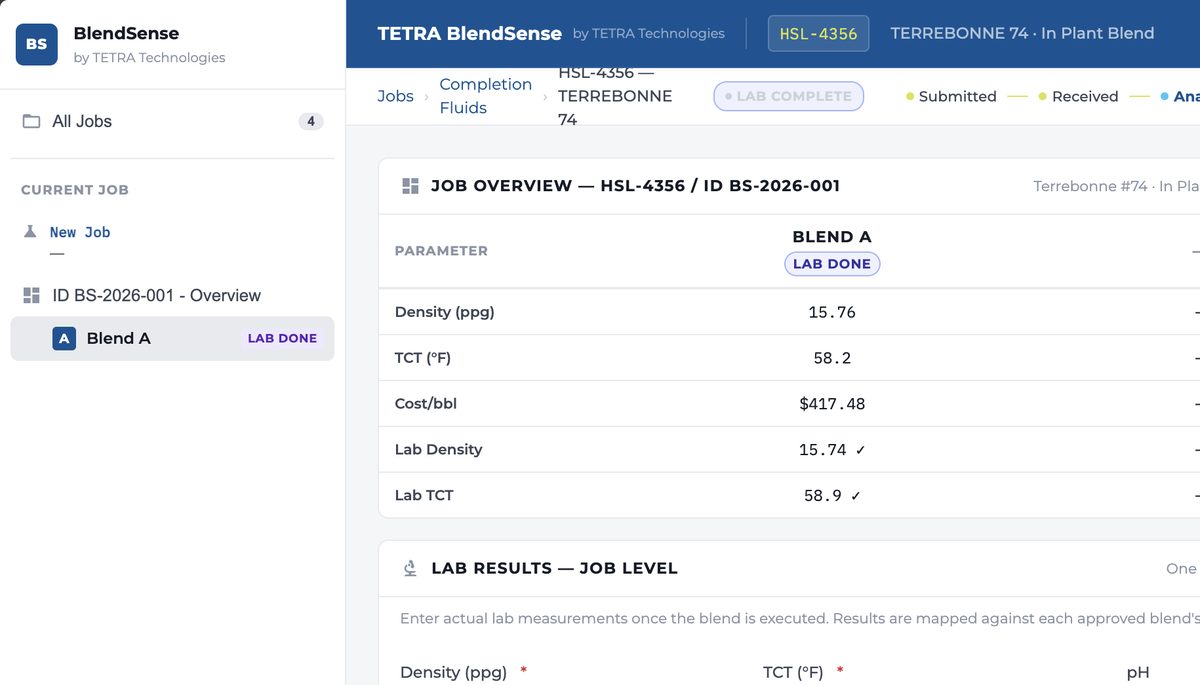
Four discovery sessions with TETRA's operations and data science teams established that the primary user — the Plant Operations Manager — needed a workflow anchored to Jira tickets (the existing job tracking system) and connected to BlueLinx, TETRA's internal plant monitoring API. Every design decision had to make sense within that mental model: jobs → pilots → blend results → approval → lab validation.
Prototyping with Claude
This project became an active experiment in AI-assisted UX work. Rather than produce static Figma screens, I used Claude (Anthropic) as a design collaborator — describing interaction patterns, iterating on component states, and generating functional HTML prototypes directly from conversation.
The approach compressed iteration cycles significantly: a full-fidelity interactive mockup could be reviewed by engineers and stakeholders within hours of a discovery session, rather than days. By v7, the prototype had accumulated TETRA's full brand token system, all major user flows, and was close enough to production quality that it directly informed the React implementation.
How AI Compressed the Design Loop
The diagram maps the real flow of inputs, AI-augmented work, and deliverables across the BlendSense engagement. Link weight reflects dependency intensity — TETRA domain knowledge was the bottleneck that unlocked AI quality. Hover any node or link for context.
From Jira Ticket to Approved Blend
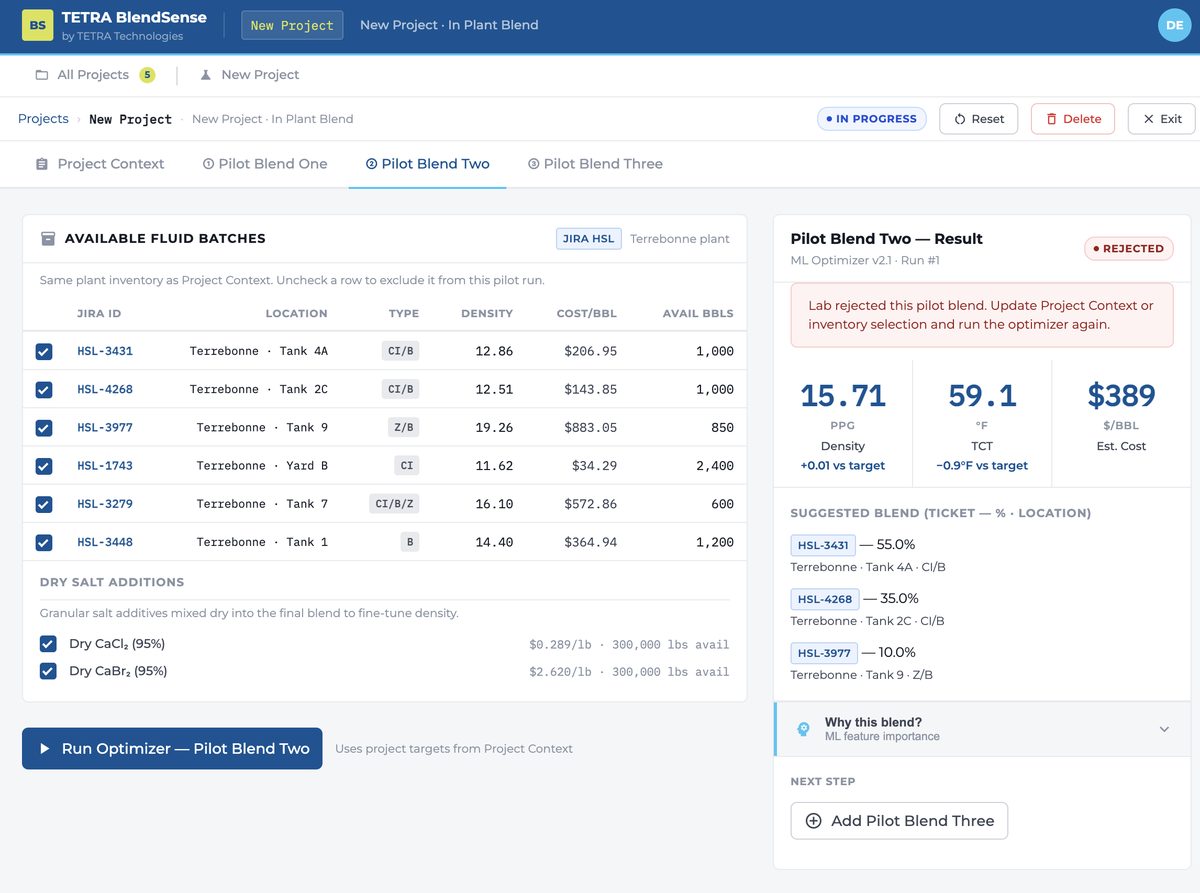
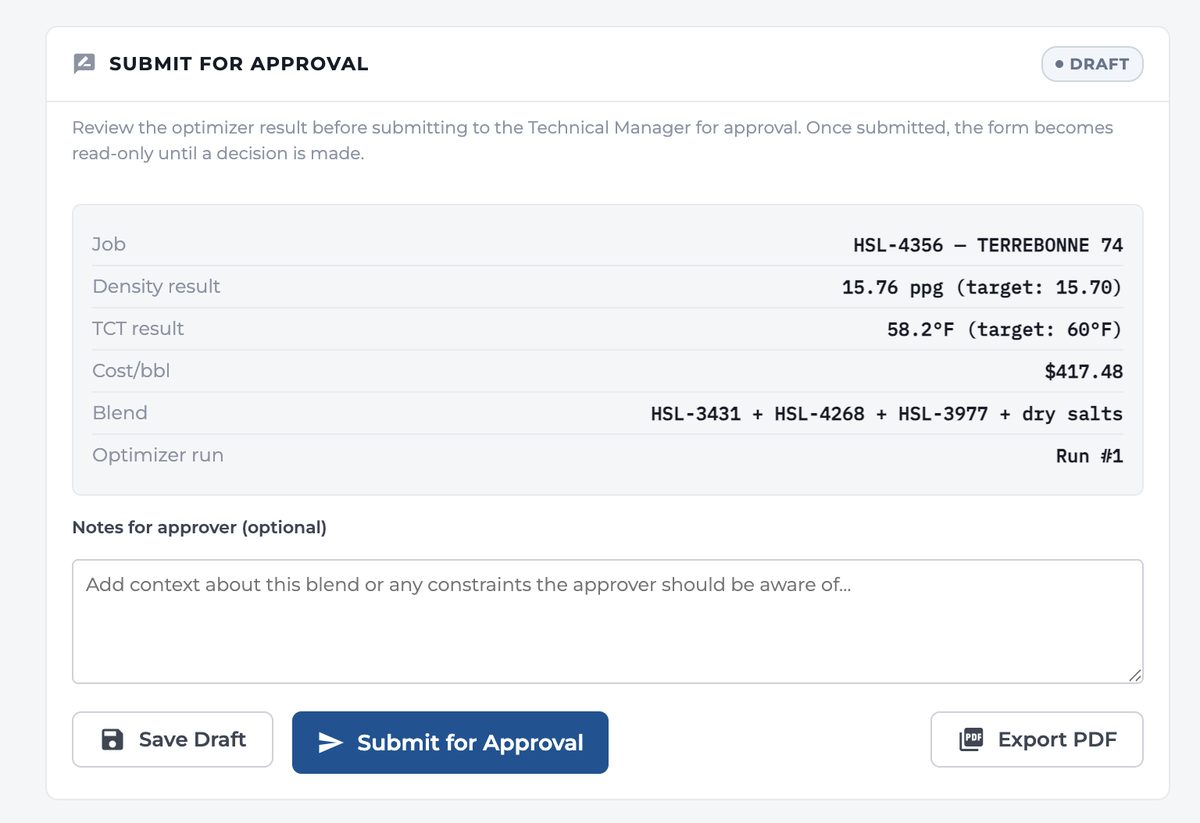
The core workflow follows a Project → Pilot → Run → Approve loop. Each project can hold up to three pilot blends; only one can be approved for production. The UI surfaces the ML result alongside a comparison against the legacy BlendMaster output — giving operations managers confidence in the recommendation before committing to a run.
Building the TETRA UI Kit
Alongside the prototype work, a dedicated Figma component library was built to give the engineering team a clear, token-driven reference for every UI surface in TETRA BlendSense.
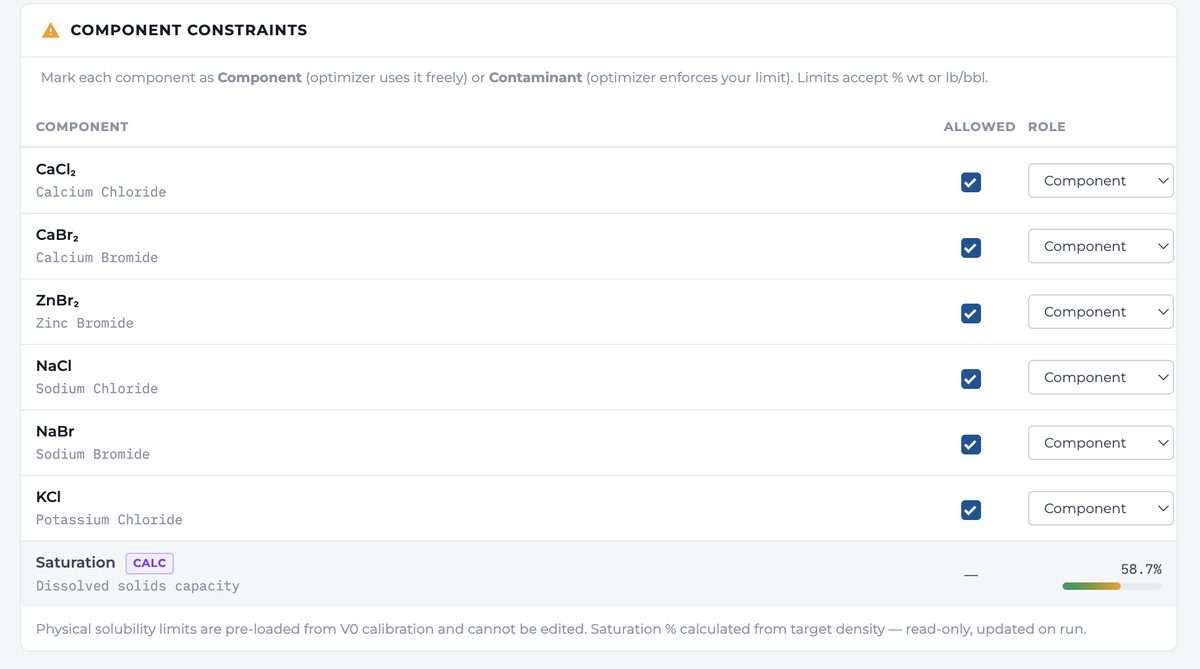
The kit covers form controls (dropdowns, number inputs, inline validation), data table patterns (sortable columns, status chips, inline edits), modal flows (confirmation dialogs, optimizer progress, approval submission), and the three-panel shell itself.
Design tokens follow the TETRA brand palette directly — primary blue for structural authority, cyan for interactive accents, and citron reserved exclusively for commit actions. All components carry accessibility annotations, contrast ratios, and keyboard interaction specs ready for developer handoff.
Why These Choices
Used Shadcn/ui + Tailwind as the component base, building on top of Radix primitives. The data-dense nature of the interface — dense tables, inline chemical formulas, multi-state status chips — needed a system that could scale without visual debt. Shadcn's unstyled base let us apply TETRA tokens cleanly.
TETRA's brand palette maps naturally to information hierarchy: #005495 primary blue for authority and nav, #38C6F4 cyan for accent and topbar stripe, and #DAE24C citron reserved exclusively for primary CTAs — Run Optimizer, Save to Jira, Submit for Approval. The citron stands out against both dark and light backgrounds and signals "this commits to action."
Montserrat for UI surfaces (authority, legibility at small sizes in data tables) paired with IBM Plex Mono for values, ticket numbers, chemical formulas, and any data that needs character-level precision. Engineers read mono; it signals trustworthiness for numerical output.
Left sidebar for job navigation (All Jobs → Current Job → Pilot tabs), center for the active workflow form, right panel for the optimizer result and comparison table. This maps to how operations managers actually work: they hold the job context in their head while checking results against targets. The layout externalizes that mental model.
Technical Context
BlendSense is a standalone Azure-hosted web application. The frontend is React + Next.js; Python APIs handle ML orchestration, Jira sync, and BlueLinx data retrieval. From a UX perspective, the architecture meant designing around API latency: the optimizer takes 1–2 minutes to return results, requiring explicit loading state design and a clear "run in progress" pattern that doesn't lock the interface.
What surprised me most was how productive the AI-assisted prototyping workflow became once the domain was well-established. The first few iterations were mostly me learning the chemical vocabulary — what density means in ppg vs kg/L, what TCT (Thermodynamic Crystallization Temperature) constrains. Once that was solid, the AI could generate accurate UI scaffolding because I could describe the domain precisely. The quality of the prototype was a direct function of the quality of my domain knowledge. That's a lesson I'll carry forward.